
ViniVault/Value
A guide to what your vinyl collection is worth
Collection value adds one figure for each record you own and shows the shelf as a single total, in pounds. It is a collector's guide to the shelf as a whole. A shop, a private buyer, or an insurer may see the same records differently.
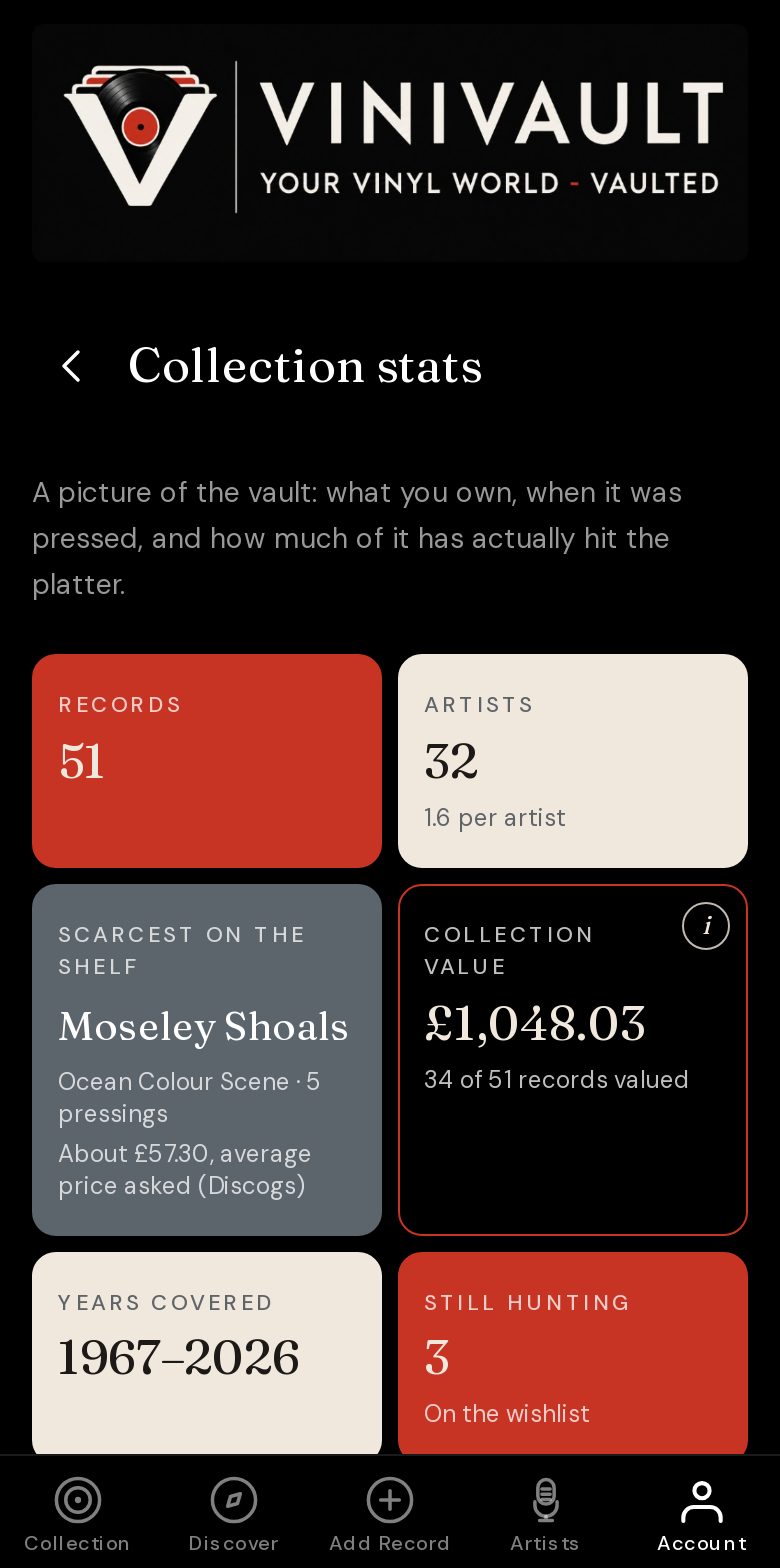
One figure for each record you own
Open Collection stats once the records are in your vault. Collection value is the sum of one figure per record. Under the total, a line says how many records are included. That count belongs with the number. A total built from forty prices is the sum of those forty records, and the line is what tells you so.
Only records you own are included. A title on the wishlist is something you are still looking for, so it stays out. A record you have lent to someone else stays in, because it is still yours. The loan log records the loan. It does not take the record off the shelf, and it does not take it out of the total.
The figure is in pounds. It follows the copies you catalogued, with the pressing you chose when you added each one. A record you have not added cannot appear, however famous the album is.
The price you typed comes first
If you enter what you paid, that number is the one used for that copy. It replaces any marketplace figure. You can change it later from the record page, and the total follows whatever is typed there now.
Zero counts. A gift, a swap, or a record that came with a house can be entered as zero. Zero is a price you chose. It keeps that record in the total as nothing, so a current asking price cannot stand in for money you did not spend.
Leave the field empty when you want the guide. ViniVault supplies a price only where you have not typed one. The moment a number is there, including zero, that number is the one that counts.
What you paid is the one price you know for certain. It is a record of the purchase, and it may differ from what the copy would sell for today. If you would rather the total followed a current guide, leave the field blank.
Where no price has been typed
ViniVault then looks at Discogs for the pressing you saved. It takes the middle price currently asked for copies graded Very Good, Very Good Plus, or Near Mint. Those grades are the range collectors usually mean by an ordinary playable used copy. A Near Mint price on its own would describe a cleaner jacket than most played records have. The cheapest listing is left out, because a poor copy or a stray low price is a weak description of the album.
Listings under a pound are set aside, so a penny price cannot pull the record down. If that pressing has no usable listings, ViniVault can look for the same album. When Discogs still has nothing sensible, the average of recent eBay sales of that album on vinyl can be used. Compact discs, cassettes, and lots of several records are not treated as the price of your copy.
Your condition note stays on the record for you. It does not change the guide, because ViniVault has not seen the sleeve or the vinyl. If the copy in your hands is badly worn, or genuinely clean, type the price you want that record to contribute. A star rating, the hours logged on a stylus, and the care notes do not move the total either.
How to read a total that moves
Asking prices change. A common reissue can shift when a few new copies are listed, and the middle price moves with them. A price you typed stays where you left it. The rest of the shelf can change from one week to the next, because it is following current listings.
Some records take a while to price, and some never find a usable figure. Scarce pressings often have nothing listed. An empty price is kept out of the sum. While lookups are still running, the total can rise as figures arrive. The line under it shows how many records are in the sum. On Collection stats you can also see how many records are still being priced.
A large total on a shelf of famous albums is often a pile of ordinary reissues. A modest total can hide one scarce single. Scarcest on the shelf is the place to look at that copy on its own, with its own guide price. Collection value will not pick that record out for you. It is the shelf as one number.
What the figure is for
Use it when you want the collection in pounds, with a method you can explain. Your price is used where you typed one. Otherwise the figure is a middle asking price for a normal used copy, or a recent sold price when Discogs has nothing usable. It is a way to look at the shelf you already own.
A shop buys stock at a price that leaves room to sell it on. An insurer has forms, exclusions, and its own view of condition. A private buyer is looking at the records in front of them. Price a real sale from the copy and the person who wants it. This total is your guide to the shelf, and each of those people will make their own judgement.
Do it in this order
Step 1
Catalogue the copies you own
Collection value can only price records already in the vault. Search for the artist and album, then choose the pressing that matches the copy on the shelf.
Step 2
Type the prices you know
On each record, enter what you paid while you still remember it. Use zero for a gift. Leave the field empty where you would rather see a current guide.
Step 3
Leave the market prices to ViniVault
For every blank price, ViniVault looks up a guide in the background. You do not fetch them one by one. On a large shelf the first pass takes a while, because each record is priced in turn.
Step 4
Open Collection stats
The collection value shows the total in pounds, and how many records are included. Read both. A total with a short count is a partial total.
Step 5
Come back when the shelf changes
Add a new record, edit a typed price, or move a wanted title onto the shelf when you buy it. The total follows the vault. A Discogs collection is copied only when you import it.
Questions
- Will this tell me the exact sale price of my collection?
- No. It is a guide built from prices you typed and from prices currently asked or recently sold. A dealer or a private buyer may offer something different, especially for the collection as one lot.
- Does a typed price always win?
- Yes. Whatever you enter on the record is the figure used for that copy, including zero. Clear the field if you want the marketplace guide back.
- Are wishlist records included?
- No. The wishlist is what you are still hunting. Those titles are not owned, so they are not part of the total. When you collect one onto the shelf, it can join.
- Why has the number changed since yesterday?
- Asking prices move, and records that were still being priced join the total when a figure arrives. A typed price stays put, because it is yours.
- Does the condition I wrote down change the price?
- The condition note stays on the record for you. It does not alter the guide. The guide comes from listings in a typical used range, not from a look at your copy. Type your own price if that copy should count differently.
- Can I use this figure for insurance?
- Treat it as a collector's note. If you need a sum insured, ask the insurer what evidence they want. This total is not a valuation an insurer has accepted.
- What if Discogs has no listings for a record?
- That record stays out of the total until a usable price is found. ViniVault can then use the average of recent eBay sales for the same album on vinyl. If neither place has a sensible price, the record remains unpriced, and the count under the total shows the gap.
- Is the cheapest copy on Discogs the one you use?
- No. The guide uses the middle price asked for Very Good, Very Good Plus, and Near Mint copies. A single cheap listing is a poor way to describe an album, and listings under a pound are ignored.